
Combi Tray Light products offer benefits in terms of reduced environmental impact, ease of use, traceability and an opportunity to benefit from Tecan’s future product innovation. You can learn more about these products here.
The figure below can be used to identify the SLAS tray type you are using:
| Combi Tray Light (CTL) | Combi Tray (CT) - legacy | SBS - legacy |
.png?width=157&height=83&name=CombiTrayLight(CTL).png) |
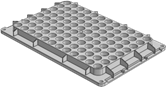 |
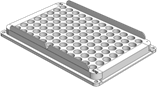 |
AirFCA or Liquid FCA arm:
For Fluent Instruments with AirFCA or Liquid FCA arm switching to Combi Tray Light, the most optimal instrument performance is with an upgrade to FluentControl 3.8 SP1 (or a related FluentControl patch: FC 3.7 Patch 2 or FC 3.7 SP1 Patch 1). These adjustments prevent unintentional lifting of the Combi Tray Light or the Tip Box during tip pickup of 1000 µl or 1000µl wide bore disposable tips. (Note: this can also be prevented by ensuring good Y axis alignment of pipetting channels on the arm)
Procedure when using default labware definitions:
To update your labware definitions when using default labware definitions:
- Update your instrument software to FluentControl 3.8 SP1
(or alternatively use FluentControl 3.7 SP1 Patch 1 or FluentControl 3.7 Patch 2) - Download the v2.0 labware files for FCA and FluentControl 3.8 SP1 from our homepage (https://tecan-link.com/LabDev)
- Manually import the downloaded labware definition “with conflicts” to overwrite the current definitions
- When importing methods from older FluentControl versions after the labware import, exclude (remove conflicts) disposable tip labware so the latest definitions are retained.
Procedure when using custom labware definitions:
To update your labware definitions when using custom labware definitions:
- Update your instrument software to FluentControl 3.8 SP1
(or alternatively use FluentControl 3.7 SP1 Patch 1 or FluentControl 3.7 Patch 2) - Ensure the following attributes are set (per screenshot below)
- PickupDelayBetweenChannels: 1:250, 2:250, 3:250, 4:150, 5:150, 6:150, 7:150, 8:150
- PickupAcceleration: 2200 mm/s²
- PickupRetractSpeed: 210 mm/s

 Important info: If you are using customized box labware definitions or require lid handling additional adjustments are needed. Please contact Tecan customer support for additional assistance
Using legacy SLAS/SBS Tray in parallel during transition testing
To use legacy SBS LiHa tip products in parallel whilst you transition to Combi Tray Light follow the procedure.
When using default labware definitions with legacy SBS products
- Upgrade from FluentControl 3.8 or earlier - after upgrading, the new default labware definitions (with correct mount offset for SBS - legacy tips) are imported automatically. Alternatively, the v2.0 legacy labware definitions can also be downloaded from this web page: https://tecan-link.com/LabDev
- When importing methods from older FluentControl versions, exclude (remove conflicts) disposable tip labware so the latest definitions are retained.
When using custom labware definitions with legacy SBS products
- Note down the current Mount Offset values for legacy SBS tips
- Ensure all required custom attributes are set according to “Procedure when using custom labware definitions” above
- Confirm that the mount offset matches the noted down values for SBS - legacy tray tips
Further Help
For further help, please refer to our Helpdesk.
401815-036