
Combi Tray Light products offer benefits in terms of reduced environmental impact, ease of use, traceability and an opportunity to benefit from Tecan’s future product innovation. You can learn more about these products here.
The figure below can be used to identify the SLAS tray type you are using:
| Combi Tray Light (CTL) | Combi Tray (CT) - legacy | SBS - legacy |
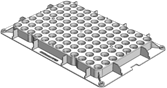 |
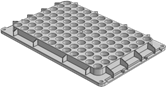 |
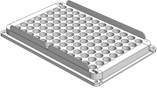 |
LiHa arm:
For EVO Instruments with a LiHa arm switching to Combi Tray Light, it is strongly recommended to make the adjustments below. These adjustments prevent unintentional lifting of the Combi Tray Light or the Tip Box during tip pickup of 1000 µl or 1000µl wide bore disposable tips.
Procedure for automated labware update:
To update your labware definitions when using default labware definitions:
- Download the v2.0 labware files for EVOware from our homepage (https://tecan-link.com/LabDev). These definitions include both improved pick up process for Combi Tray Light and updated tip mount offset positioning as communicated in 2025.
- Note: automated updates will overwrite, any additional changes that were made (like teaching a SBS box to a local instrument)
Procedure for manual labware update:
- Use the sequential DiTi pickup mode
- increase Z-Start height to 70 mm above the DiTi box (default setting: 10 mm), this can be done according to procedure “a” or “b”
- Physical measurement / Move tool: Take a ruler, measure 70 mm above the box on the correct carrier and then position the channels on that height using the move/ teaching tool. Unchain the labware height values and use the “transfer” button to update the Z-Start Value to the position the channel is currently at.
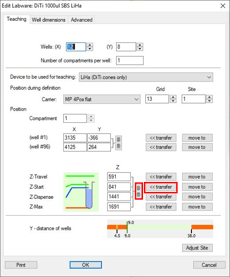
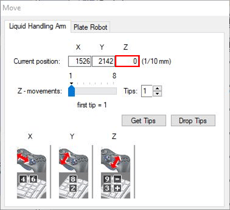
- Calculation method: Note down the original Z-Start value. Subtract "600" from this value. Replace zStart with the new value.
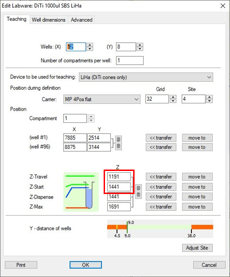
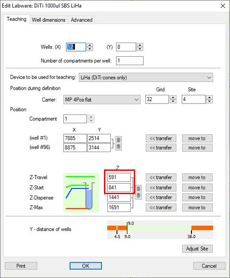
- Physical measurement / Move tool: Take a ruler, measure 70 mm above the box on the correct carrier and then position the channels on that height using the move/ teaching tool. Unchain the labware height values and use the “transfer” button to update the Z-Start Value to the position the channel is currently at.
- Ensure to set the Tip Offset for Swiss or US origin tips as communicated in 2025. To do this update the mount offset (called “Tip Offset” in EVOware) to reflect the new US/Swiss tip specifications (increase by 0.3–0.6 mm compared to SBS - legacy tips), per the table below:
|
Tip size |
Tray type |
Applicable part numbers |
New TipOffset value |
|
1000 µl |
SLAS (Combi Tray Light) |
30201342, 30199162, 30201344 (WB) |
332 |
|
Hanging |
10612554, 10612555, 10612513, 30064860, 30064861 |
||
|
200 µl |
SLAS (Combi Tray Light) |
30201340, 30201341 |
-43 |
|
Hanging |
10612552, 10612553, 30064848, 30064849 |
||
|
50 µl |
SLAS (Combi Tray Light) |
30201338, 30201339 |
-50 |
|
Hanging |
30200713, 30200712 |
Further Help
For further help, please refer to our Helpdesk.
401812-030