
General information on barcodes
The barcodes on Tecan consumables enhance traceability in your lab and enable us to better support you in troubleshooting.
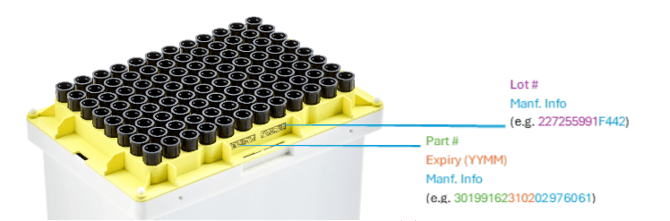
The 2D barcodes on product trays encode information such as part number, lot number, and expiry date as shown in Figure 1 below.
Figure 1. Barcode information included on tray
Using barcode information in your scripts
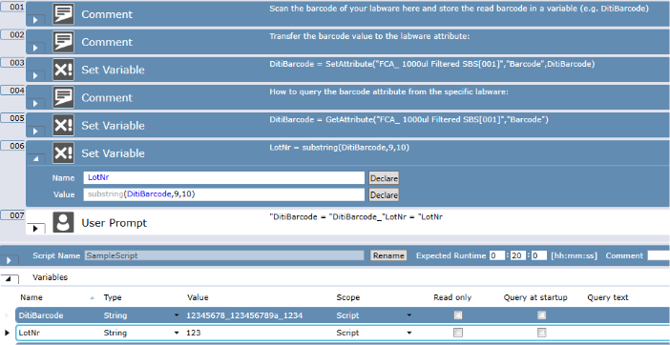
- Prompt to scan barcode added to script (step line 1 in Figure 2)
e.g. Manually Scan Labware, Variable or User Input script command - Transfer scanned data to an attribute (step line 3 in Figure 2)
- Retrieve the string value of the barcode from the attributes (step line 5 in Figure 2)
- Assuming the data is in the format: PartNumber_LotNr_ID = 8digitNr_10digitNr_4digitNr. In this case, you can use the FluentControl function Substring(variable, start, count length) (step line 6 in Figure 2)
- You can use this information as required. For example, you can transfer this information to Introspect using the variable INTROSPECT_LotNr or export it to an external file using the Export Variable command.
Figure 2 Barcode information handling in FluentControl
Further Help
For further help, please refer to our Helpdesk.
401815-038