
Due to a recent update in the authentication provisioning, Introspect registration is not working reliably at all times.
The registration process fails silently and you might see an error or you only see that your instrument is still not registered.
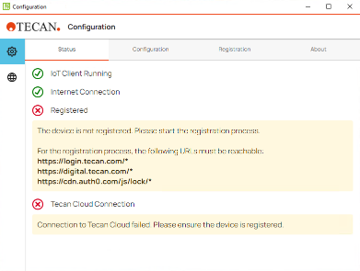
Affected IoT Client
It affects IoT Client Version 3.0 and 3.1
Solution
There is an easy solution that requires a config file update before the registration.
Please follow the steps below:
1. Download the file. configuration.json [configuration.json]
2. Copy and replace the file stored in in C:\Program Files\Tecan\IoT Client\Applications\Configuration Tool\resources\app\plugins\configuration
3. Reboot the system/PC
4. Start FluentControl and register the instrument via the IoT Client
Further Help
For further help, please refer to our Helpdesk.
Link to Tecan Product Page
403020-009